What is CI? CI, Builds, Agents
Somebody is wrong on the internet. Today it’s my turn?
CI, ideally, is a deterministic function from your source tree to a boolean: are the tests passing or not? In practice, it usually also returns some artifacts: logs, build outputs, structured per-test output. (The de-facto standard for "what tests ran" is a JUnit XML file.)
Thrice in my career, I've attacked (or been attacked by) build or CI problems. When CI gets slow enough (or non-deterministic enough), you suddenly find a lot of time on your hands to fix CI. I’ve observed a few patterns.
Goals #
Faster is better. More reliable is better.
It must be possible to run CI against a commit that's not in main. (If you can only test after pushing, you destroy the important feedback loop that prevents one person’s problem becoming everyone’s.)
The CI itself should be iterated on using itself. For example, going from two tests running serially to two tests running in parallel should be expressible as a commit in your code base.
There is always a trade-off in how hermetic the CI is; choose appropriately for your stack.
For this blog post, we consider the inputs to CI trusted. Running tests on pull requests from the public is a non-goal. That's a different can of worms.
Caching #
Most builds download and build a bunch of stuff; caching is obvious, and good. Caching is a trade-off: the thing you're downloading may get corrupted or may not longer exist, and so you've lost some determinism. Caching done poorly (GitHub Actions on hosted runners) can be as slow as the download it tries to prevent. Some ecosystems cache well (I trust the Go build cache). Some are frail under concurrency.
Parallelism #
1 CPU for 4 minutes and 4 CPUs for 1 minute cost the same. Therefore, if using 4 CPUs improves latency, you should always choose to parallelize.
How you parallelize will depend on your ecosystem. The simplest case is an
ecosystem where the test runner parallelizes tests into threads or processes
for you. You need to figure out what your ecosystem does! For example, go test parallelizes across packages, and if you've got lots of packages, it'll
run lots of unix processes, and you're all set. Within a package, you have to
tell Go about parallelism though. Node/JavaScript are single-threaded, so JS
test frame works have to use worker threads (or processes) to get parallelism
past 1 CPU. Jest, for example, does this.
Running lots of threads/processes on a single-machine tends to be better than splitting up your CI across lots of machines. If you can, borrow bigger machines that can host your entire build rather than endeavoring to parallelize across machines.
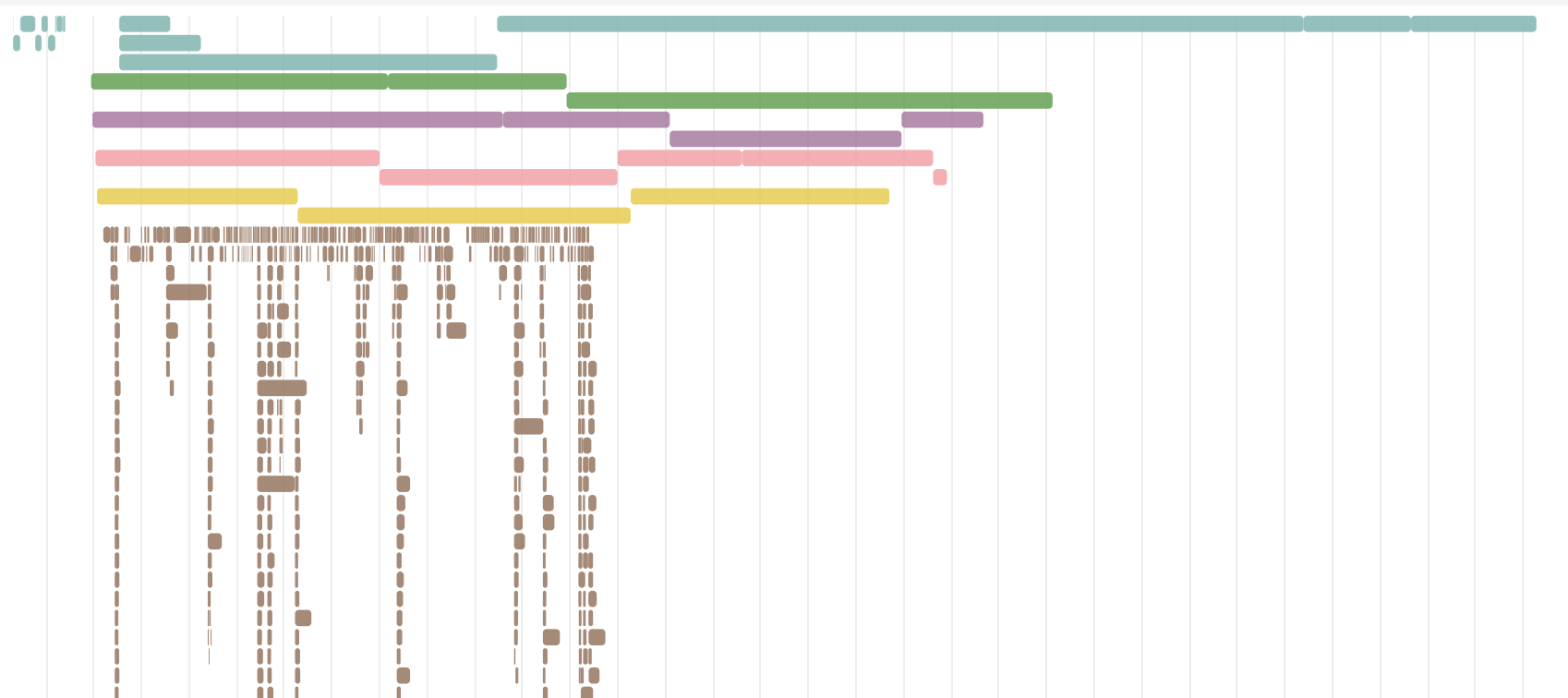
The ideal with parallelism is that your CI run is the duration of your longest individual test. You have 64 CPUs and 60 tests, and they all run in parallel, and they finish when the slowest test finishes. In reality, you'll have more tests than CPU, and it's useful for the slowest test to run first. You can see this as a straggler problem when you see lots of CPUs being used for most the test run, and then the test run keeps going with a thin tail. You'll end up checking in a list of tests with their durations, and updating that every once in a while. You'll end up teaching your test framework about ordering constraints.
Dependency Graphs #
Any sufficiently complicated CI will contain an ad-hoc dependency graph in it. Embrace it, and maybe even specify it (with make, ninja, python, or whatever).
You need to familiarize yourself with the critical path. It's easy to improve something that doesn't matter, because it's not on the critical path.
A timeline visualization will be helpful to produce.
Isolation #
When you start parallelizng, you find that two tests use a shared resource: a port, a file on disk, a database (which is of course a port, a file, or both), and so on. Ideally, you let Linux determine the ports by binding to 0, and avoid shared resources. (Or perhaps your tests have scaffolding such that there's parallelism, but they all share a database; details will vary!)
Docker can be a trump card for isolation. If ports are a problem, you can give every test its own network namespace by running it in its own container. By cross-mounting file-systems, you can avoid the expensive git checkouts or builds for every test, while giving them a good deal of isolation. Docker is "just" a UX for Linux namespaces, but it can be very handy!
Logging with timestamps, "annotate" #
Like all performance work, you need to measure, and not guess. And you'll be surprised by the results.
The most common measurement is log lines. If they don't already include timestamps with subsecond accuracy, then pipe them through something that adds them, like the annotate script below and at https://github.com/philz/annotate.
$cat annotate.py
#!/usr/bin/python -u
#
# Puts a timestamp before any stdin input.
#
# Note that "python -u" disables buffering.

import sys
import datetime

while True:
  line = sys.stdin.readline()
  if line == "":
    sys.exit(0)
  sys.stdout.write(datetime.datetime.now().strftime("%Y-%m-%d %H:%M:%S.%f "))
  sys.stdout.write(line)
Metrics #
You want to be able to see if the CI machine is starved of resources during
your build. Linux has these sweet "Pressure Stall Indicator" metrics in
/proc/pressure/cpu, /proc/pressure/memory, /proc/pressure/io. Collect
them for the duration of your tests and plot them. They will immediately show
you whether you have a CPU or IO or Memory problem. Collect CPU usage
(/proc/stat, in bullshit hundredth of a CPU-second units called jiffies). The
CPU chart will tell you if you have a "not enough parallelism" problem.
/dev/shm and other consistency-defying tricks #
If you have an IO problem, there's a magical filesystem called /dev/shm that is in-memory. (Note that Docker has a default max-shm size that will trip you up.)
If you need a database in your CI, you can tune it to be non-durable (and to avoid fsync). You can lose data in tests if the machien crashes, so take the speed win. (You can also tune filesystem mounts to be non-durable as well.)
Avoid shell #
See my other post on how dependency-free python3 is my favorite scripting language.
Your build will outgrow your shell script.
Vendors & GitHub Actions #
GitHub Actions is quite tragic, because it looks like you can do parallelism by having lots of steps in their yaml, but they run serially or on different machines. Buildkite has a better model here. (See my post on Buildkite.)
A "funny" story #
One of those times when I redid a build, I accidentally made it so that my CI function always returned true, even if the commits themselves were bad. We figured this out after a few days. Oopsie. No customers were hurt, but I still feel bad about causing a few folks a lot of cleanup one Friday evening.
Agents #
The visualizations, data gathering, and log analysis that I mention above has never been easier. Give your agent access to the build, and it'll do a decent job of identifying potential ideas. One of the impediments to a fast build has always been the sheer amount of experiments you need to do, and agents are excellent at that particular feedback loop.
In particular, migrating from one CI system to another is something that agents can do overnight.